ArduPilot · Mission Planning · MAVLink
ArduPilot Autonomous Mission Planning
By Aeroniti Engineering · Published 2026-07-19 · Updated 2026-07-19
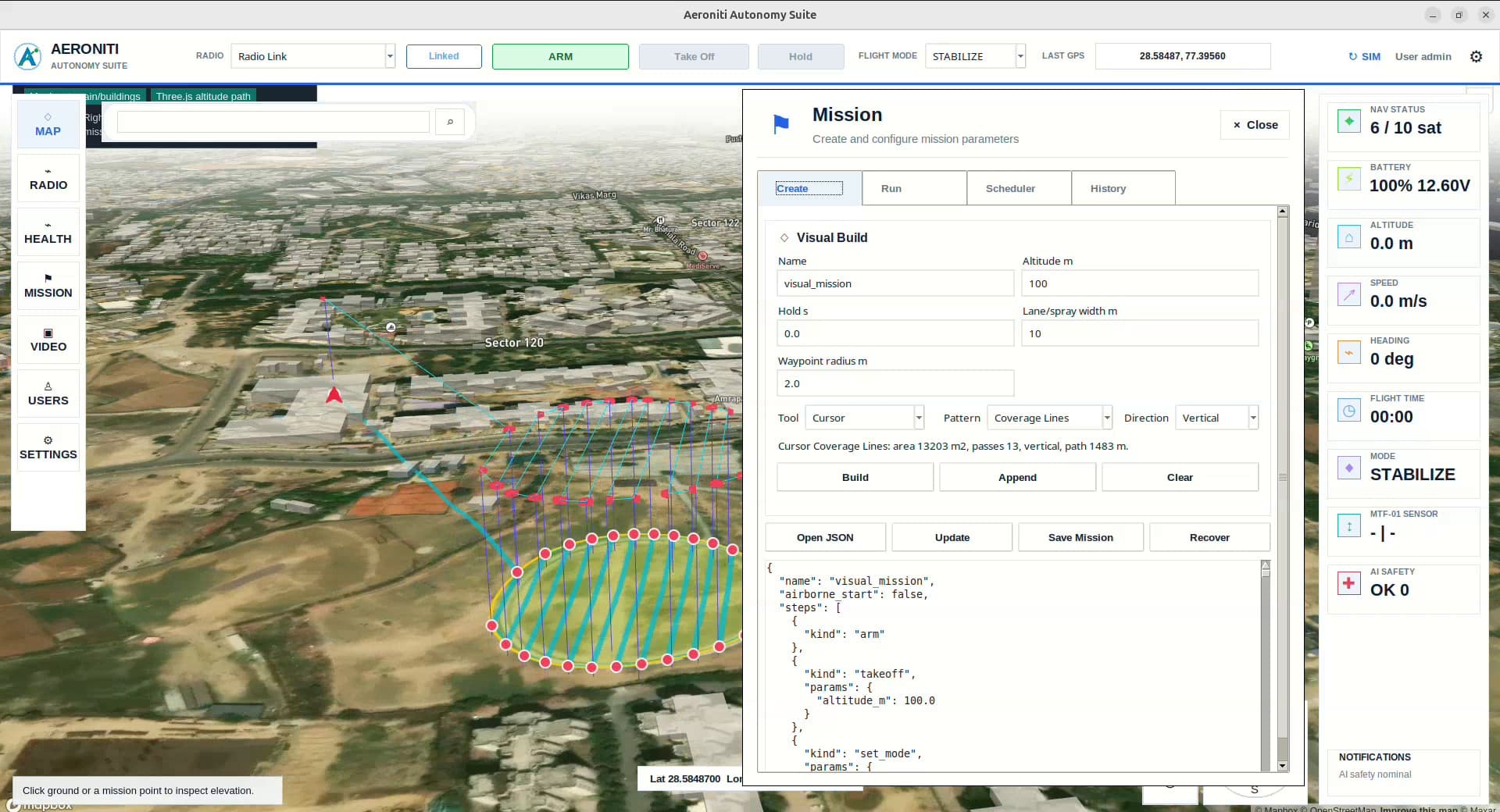
ArduPilot mission planning commonly begins with a sequence of mission items: waypoints, takeoff, landing, loiter, speed changes, camera triggers, region-of-interest actions, or other supported commands. A sequence that uploads successfully is not necessarily a safe or complete mission. It must fit the vehicle, location, energy budget, terrain, airspace, communication plan, and recovery strategy.
A ground system can add 3D preview, reusable templates, scheduling, payload stages, and operator workflows around the ArduPilot mission protocol. A companion computer can add perception-based decisions. ArduPilot remains responsible for executing supported vehicle behavior and configured failsafes through the flight controller.
Architecture flow
The following simplified flow shows where information is interpreted and where flight-safe execution remains separated. Actual interfaces, rates, redundancy, and authority depend on the aircraft and mission.
What ArduPilot mission planning means in practice
ArduPilot mission planning is the process of defining, validating, transferring, executing, and supervising a structured set of vehicle actions. Good planning covers the nominal route and every transition into takeoff, payload work, hold, return, landing, abort, or pilot override.
01 — Mission items
encode navigation points and supported commands in an ordered sequence For ArduPilot mission planning, verify this against the aircraft, mission objective, compute budget, sensors, communication link, and flight-safety boundary.
02 — Vehicle parameters
determine speed, acceptance radius, navigation, altitude, failsafe, and mode behavior For ArduPilot mission planning, verify this against the aircraft, mission objective, compute budget, sensors, communication link, and flight-safety boundary.
03 — Fence and rally data
define operating boundaries and suitable recovery references For ArduPilot mission planning, verify this against the aircraft, mission objective, compute budget, sensors, communication link, and flight-safety boundary.
04 — Ground planner
creates, validates, versions, previews, transfers, and supervises the mission For ArduPilot mission planning, verify this against the aircraft, mission objective, compute budget, sensors, communication link, and flight-safety boundary.
Architecture and component responsibilities
A useful architecture assigns each component a narrow responsibility and makes every authority transition visible. For ArduPilot mission planning, system quality depends less on one device than on how data, commands, acknowledgements, and failures move between components.
01 — MAVLink mission protocol
uses item requests, sequence numbers, retries, and final acknowledgement For ArduPilot mission planning, verify this against message ownership, update rate, latency, stale-data handling, command acknowledgement, and operator authority.
02 — Altitude reference
relative, absolute, terrain-aware, and frame choices must be understood consistently For ArduPilot mission planning, verify this against message ownership, update rate, latency, stale-data handling, command acknowledgement, and operator authority.
03 — Companion interaction
mission progress and high-level requests need defined ownership and supported modes For ArduPilot mission planning, verify this against message ownership, update rate, latency, stale-data handling, command acknowledgement, and operator authority.
04 — Operator control
mode changes, pause, continue, RTL, landing, and pilot takeover require tested paths For ArduPilot mission planning, verify this against message ownership, update rate, latency, stale-data handling, command acknowledgement, and operator authority.
End-to-end operating workflow
The workflow should describe the system from mission preparation through execution and recovery. The sequence below is deliberately operational: it connects software behavior with checks that an engineering team and an operator can observe.
01 — Define objective
describe the work, operating area, payload, evidence, and completion criteria For ArduPilot mission planning, verify this against mission state, pre-flight readiness, environmental conditions, flight mode, telemetry freshness, and the defined recovery path.
02 — Build route
select waypoints, altitude, speed, actions, and transitions with recovery margins For ArduPilot mission planning, verify this against mission state, pre-flight readiness, environmental conditions, flight mode, telemetry freshness, and the defined recovery path.
03 — Validate and upload
check mission semantics, vehicle compatibility, fence, energy, and acknowledged transfer For ArduPilot mission planning, verify this against mission state, pre-flight readiness, environmental conditions, flight mode, telemetry freshness, and the defined recovery path.
04 — Execute and supervise
monitor current item, cross-track behavior, vehicle health, links, and fallback readiness For ArduPilot mission planning, verify this against mission state, pre-flight readiness, environmental conditions, flight mode, telemetry freshness, and the defined recovery path.
Engineering design considerations
A technically credible system is built around constraints rather than ideal demonstrations. These considerations shape hardware selection, software boundaries, test coverage, and the conditions under which the capability should or should not be enabled.
01 — Waypoint geometry
turns, climb rate, stopping distance, wind, acceptance radius, and obstacle clearance matter For ArduPilot mission planning, verify this against power, mass, thermal limits, vibration, electromagnetic compatibility, timing, maintainability, and safe degradation.
02 — Energy reserve
calculate takeoff, route, payload, wind, loiter, return, landing, and battery-aging margin For ArduPilot mission planning, verify this against power, mass, thermal limits, vibration, electromagnetic compatibility, timing, maintainability, and safe degradation.
03 — Mode semantics
understand how each command behaves for the vehicle type and current firmware For ArduPilot mission planning, verify this against power, mass, thermal limits, vibration, electromagnetic compatibility, timing, maintainability, and safe degradation.
04 — Mission versioning
the operator must know that the displayed, approved, and onboard mission are identical For ArduPilot mission planning, verify this against power, mass, thermal limits, vibration, electromagnetic compatibility, timing, maintainability, and safe degradation.
Limitations and failure modes
No autonomy or sensing capability should be presented as certain in every environment. Identifying limitations early prevents a promising prototype from becoming an unsafe or unreliable field workflow.
01 — Map and terrain data
digital sources may be incomplete, coarse, outdated, or based on a different altitude reference For ArduPilot mission planning, verify this against sensor uncertainty, occlusion, weather, range, vehicle dynamics, communications, human factors, and regulatory operating limits.
02 — GNSS and estimator error
planned coordinates do not guarantee exact physical position For ArduPilot mission planning, verify this against sensor uncertainty, occlusion, weather, range, vehicle dynamics, communications, human factors, and regulatory operating limits.
03 — Wind and dynamics
the aircraft may not follow sharp geometry or assumed timing exactly For ArduPilot mission planning, verify this against sensor uncertainty, occlusion, weather, range, vehicle dynamics, communications, human factors, and regulatory operating limits.
04 — Mission-command variation
support and behavior can differ with ArduPilot vehicle type, release, and configuration For ArduPilot mission planning, verify this against sensor uncertainty, occlusion, weather, range, vehicle dynamics, communications, human factors, and regulatory operating limits.
Verification before flight
Verification should progress from repeatable software tests to integrated hardware and controlled flight. Passing a nominal demonstration is only one result; the team must also test missing, delayed, contradictory, and out-of-range inputs.
01 — Desktop review
inspect every command, frame, coordinate, altitude, parameter, fence, and recovery path For ArduPilot mission planning, verify this against acceptance criteria, traceable logs, repeatability, safe abort behavior, manual override, and evidence that each fallback occurs within its allowed time.
02 — SITL simulation
exercise the plan and off-nominal battery, link, navigation, and mode scenarios For ArduPilot mission planning, verify this against acceptance criteria, traceable logs, repeatability, safe abort behavior, manual override, and evidence that each fallback occurs within its allowed time.
03 — Bench transfer
confirm upload, download comparison, item sequence, current state, and command visibility For ArduPilot mission planning, verify this against acceptance criteria, traceable logs, repeatability, safe abort behavior, manual override, and evidence that each fallback occurs within its allowed time.
04 — Progressive field test
begin with simple geometry and verify override and RTL before payload or AI stages For ArduPilot mission planning, verify this against acceptance criteria, traceable logs, repeatability, safe abort behavior, manual override, and evidence that each fallback occurs within its allowed time.
Deployment and operator supervision
Field deployment combines the technical system with procedures, permissions, training, maintenance, and review. Human supervision is most effective when the interface explains what the aircraft is doing, why it is doing it, and which intervention remains available.
01 — Site confirmation
check actual terrain, obstacles, people, RF conditions, airspace, and authorization For ArduPilot mission planning, verify this against site authorization, checklists, crew roles, data handling, maintenance intervals, incident review, and change control.
02 — Readiness gate
verify mission identity, home position, fence, GNSS, estimator, battery, links, and payload For ArduPilot mission planning, verify this against site authorization, checklists, crew roles, data handling, maintenance intervals, incident review, and change control.
03 — Supervision
track current item, deviation, time, energy, vehicle health, and decision state For ArduPilot mission planning, verify this against site authorization, checklists, crew roles, data handling, maintenance intervals, incident review, and change control.
04 — Post-flight learning
compare planned and actual route, timing, energy, events, commands, and interventions For ArduPilot mission planning, verify this against site authorization, checklists, crew roles, data handling, maintenance intervals, incident review, and change control.
Frequently asked questions
These concise answers summarize common engineering questions. They do not replace the selected hardware documentation, flight testing, operating approval, or a mission-specific safety assessment.
What is an ArduPilot mission item?
It is an ordered navigation or action command transferred through the MAVLink mission protocol.
Does a successful upload mean the route is safe?
No. Geometry, terrain, vehicle capability, energy, environment, and recovery still need validation.
Can a mission be paused?
Supported behavior depends on vehicle mode and configuration, so pause and continuation must be tested.
Can onboard AI modify a mission?
A companion computer can request bounded changes through authorized interfaces while ArduPilot retains flight control.
Why use simulation first?
Simulation makes route, command, mode, and failure scenarios repeatable before physical flight risk is introduced.
Continue with Aeroniti engineering resources
Explore the related product and solution architecture, or bring Aeroniti a specific aircraft, sensor, payload, mission, and operating constraint for a focused technical discussion.